
80s Retro Trend: अपनी फोटो को दें 70s-80s का रेट्रो टच, बस लिखें ये 1 लाइन और AI कर देगा कमाल
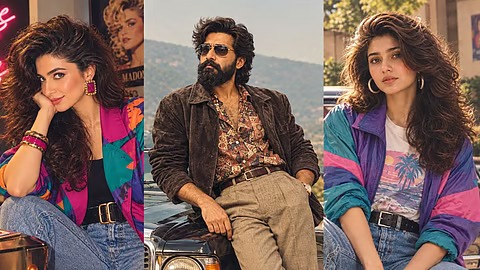
80s Retro Trend: एक ही छोटे Prompt से अपनी फोटो को दें 70s, 80s या 90s का क्लासिक अंदाज, लड़के-लड़कियों के साथ Family Photos पर भी कर सकते हैं ट्राई
सोशल मीडिया पर 80s Retro Trend AI Photo तेजी से वायरल हो रहा है। अगर आप भी अपनी फोटो को 70s, 80s या 90s के पुराने जमाने के स्टाइल में बदलना चाहते हैं, तो लंबा-चौड़ा Prompt लिखने की जरूरत नहीं। सिर्फ एक लाइन के Prompt से AI आपकी तस्वीर को Vintage अंदाज दे सकता है। कैसे? जानिए आसान तरीका।
80s Retro Trend: 1 लाइन के Prompt से बनाएं 70s, 80s और 90s का धांसू Vintage Look
सोशल मीडिया पर इन दिनों Retro AI Photo Trend का जबरदस्त क्रेज देखने को मिल रहा है। Instagram से लेकर दूसरे सोशल मीडिया प्लेटफॉर्म्स पर लोग अपनी तस्वीरों को 70s, 80s और 90s के पुराने जमाने के आइकोनिक लुक में बदलकर शेयर कर रहे हैं।
खास बात यह है कि इस ट्रेंड को फॉलो करने के लिए आपको कोई लंबा या बेहद जटिल AI Prompt लिखने की जरूरत नहीं है। सिर्फ एक लाइन का छोटा सा Prompt डालकर आप अपनी फोटो को रेट्रो अंदाज में बदल सकते हैं।
80s Retro Trend सिर्फ लड़कियों के लिए नहीं है। लड़के और यहां तक कि पूरे परिवार की फोटो को भी अलग-अलग दशक के Vintage Look में बदला जा सकता है।
सिर्फ एक लाइन लिखें और बनाएं 80s की फोटो
अगर आप देखना चाहते हैं कि 80s के दौर में आपका लुक कैसा होता, तो AI में यह छोटा सा Prompt डाल सकते हैं:
what would i have looked like in 80s
बस इतना लिखकर अपनी फोटो अपलोड करें। AI आपकी तस्वीर को 80s के अंदाज में रीक्रिएट कर सकता है।
70s और 90s का लुक भी बनाना है तो?
अगर आपको 80s की जगह 70s या 90s का लुक चाहिए, तो Prompt में सिर्फ दशक बदलना होगा।
70s के लिए:
what would i have looked like in 70s
90s के लिए:
what would i have looked like in 90s
एक ही तरह के Prompt को अलग-अलग तस्वीरों के साथ इस्तेमाल करके आप कई तरह के Retro Looks आजमा सकते हैं।
ज्यादा शानदार रिजल्ट के लिए ये Detailed Prompt करें ट्राई
अगर आप सिर्फ सामान्य रेट्रो इफेक्ट के बजाय किसी खास दशक की Authentic Vintage Photo चाहते हैं, तो थोड़ा Detailed Prompt इस्तेमाल किया जा सकता है।
1960s Look Prompt:
Transform this photo into an authentic 1960s studio portrait. Keep the facial identity, facial features, skin tone, face shape and natural appearance completely the same or unchanged. Style in an elegant 1960s outfit with a structured silhouette, vintage jewellery and a classic retro hairstyle with lots of volume inspired by the era. Use a sophisticated mid-century studio backdrop, soft directional lighting, gentle film grain, slightly muted colours and the look of an original 1960s analogue photograph. The image should feel timeless, polished and naturally photographed rather than digitally generated.
1970s Look Prompt:
Transform this photo into a glamorous 1970s portrait while keeping the exact facial identity, facial features, skin tone and natural appearance unchanged. Dress in an effortlessly stylish 1970s-inspired outfit with earthy tones, flowy textures, statement jewellery and era-appropriate layered hair. Set the portrait against a warm vintage interior with subtle glamorous details. Use golden ambient lighting, warm brown and amber tones, authentic analogue film grain and a slightly faded photographic texture, creating the feeling of a beautifully preserved 1970s family or fashion photograph.
ChatGPT से ऐसे बनाएं अपनी Retro Photo
80s Retro Trend को फॉलो करना काफी आसान है। आपको बस अपने फोन में ChatGPT ऐप खोलना है और लॉग इन करना है।
इसके बाद ऊपर दिए गए Prompt को चैट में पेस्ट करें और अपनी फोटो अपलोड करें। फोटो अपलोड करने के लिए आप चैट में दिए गए प्लस (+) आइकन का इस्तेमाल कर सकते हैं।
इसके बाद AI आपकी फोटो को दिए गए निर्देशों के अनुसार रेट्रो अंदाज में तैयार कर सकता है।
अच्छी फोटो अपलोड करना है जरूरी
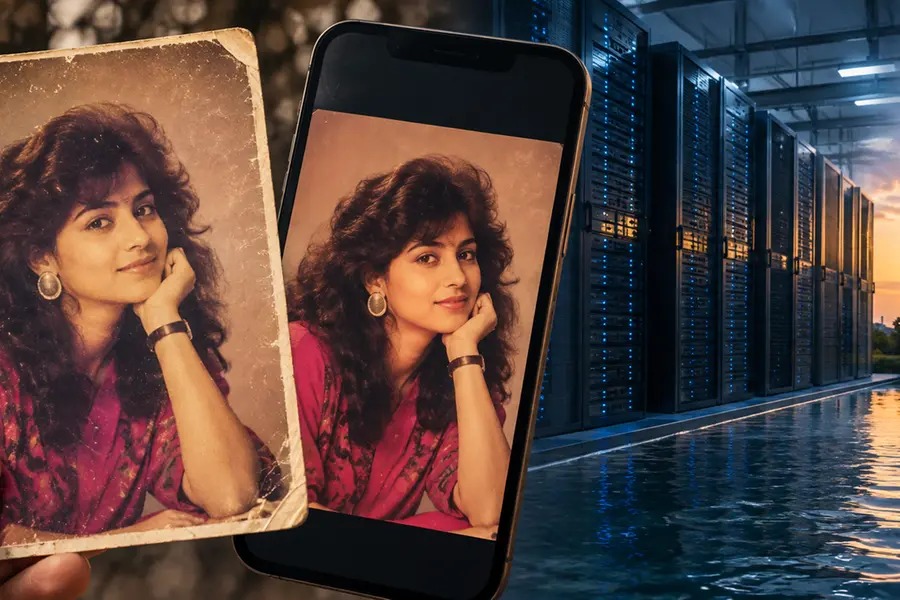
बेहतर रिजल्ट के लिए कोशिश करें कि आपकी ओरिजिनल फोटो साफ और अच्छी क्वालिटी की हो। चेहरे पर बहुत ज्यादा ब्लर, अंधेरा या दूसरे लोगों की रुकावट होने पर रिजल्ट प्रभावित हो सकता है।
आप 70s, 80s और 90s के अलग-अलग Prompt आजमाकर यह भी देख सकते हैं कि किस दौर का Vintage Look आपकी फोटो पर सबसे ज्यादा शानदार लगता है।